Opus 4.6, GPT-5.3 Codex, Agent Teams, and Fleet Mode: What Developers Actually Need to Know
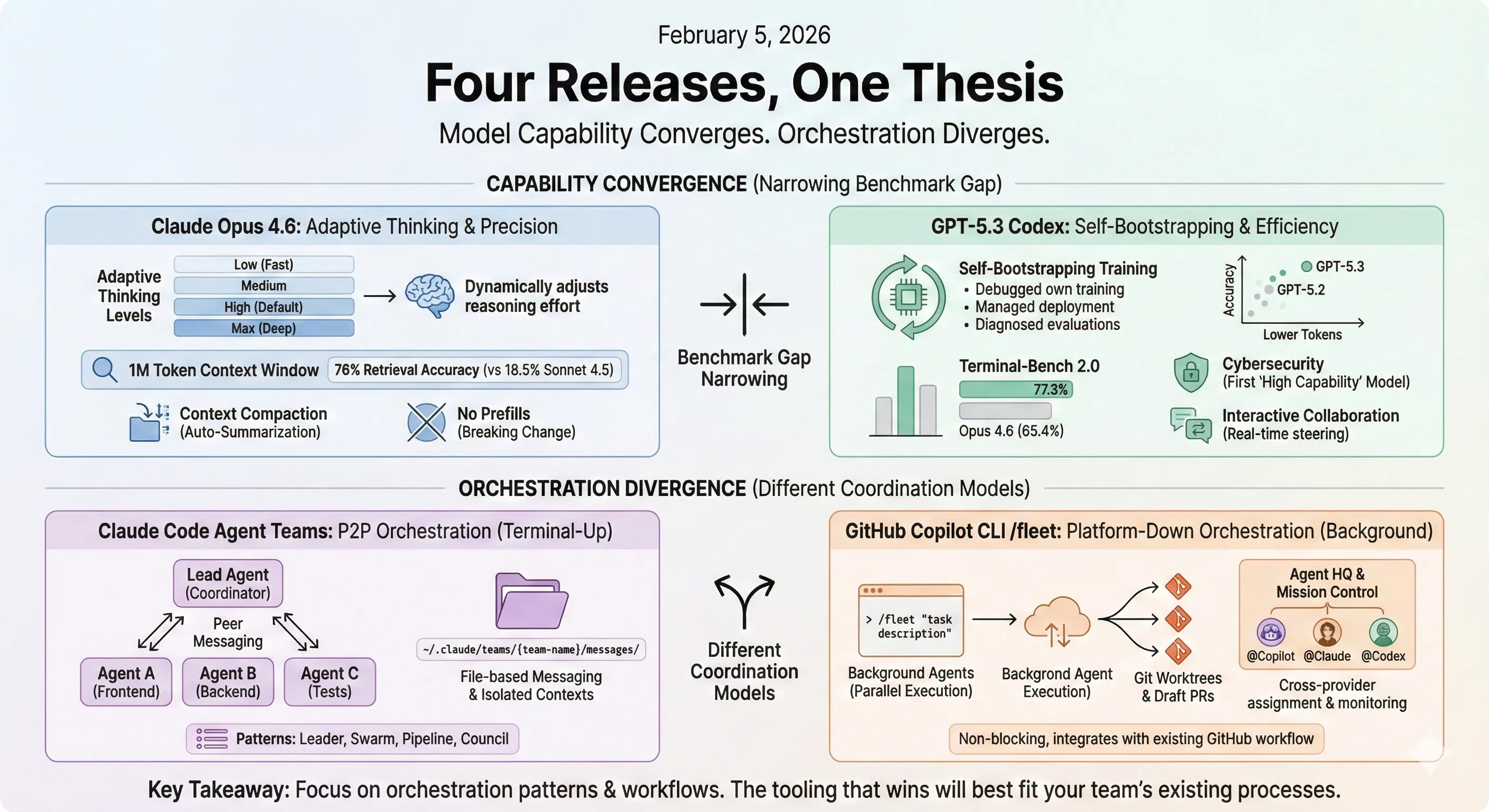
Four Releases, One Thesis
On February 5, 2026, Anthropic released Opus 4.6, OpenAI shipped GPT-5.3 Codex, Claude Code launched agent teams, and GitHub rolled out Copilot CLI’s experimental /fleet command—all within roughly 30 minutes. Having tested both models and the new multi-agent features, I think what matters most isn’t any single model’s benchmark improvement. It’s the collective signal: individual model capability is starting to converge, and orchestration is becoming the differentiator.
Here’s a technical breakdown of each release and what’s actionable for developers building with these tools.
Claude Opus 4.6: Precision Through Adaptive Thinking
Opus 4.6 is a direct upgrade to Opus 4.5. Same pricing ($5 input / $25 output per million tokens), but with three significant architectural changes.
1M Token Context Window
For the first time, an Opus-class model supports a 1 million token context window (in beta). This isn’t just a number on the MRCR v2 8-needle retrieval benchmark at 1M tokens, Opus 4.6 scores 76% compared to Sonnet 4.5’s 18.5%. That’s a 4x improvement in long-context retrieval accuracy. You enable it with the context-1m-2025-08-07 beta header, with premium pricing ($10 input / $37.50 output per million tokens) applying above 200K tokens.
Adaptive Thinking
This is the most interesting API change. Previously, extended thinking was binary on or off with a fixed token budget. Now the model dynamically decides when deeper reasoning helps:
# Old approach (deprecated on Opus 4.6)response = client.messages.create(    model="claude-opus-4-6",    thinking={"type": "enabled", "budget_tokens": 10000},    ...)
# New approachresponse = client.messages.create(    model="claude-opus-4-6",    thinking={"type": "adaptive"},    messages=[{"role": "user", "content": "..."}])
Four effort levels control how aggressively the model thinks: low, medium, high (default), and max. At high, Claude almost always thinks. At low, it may skip thinking for simple problems. This directly reduces latency and cost for straightforward tasks while preserving deep reasoning when needed.
Context Compaction
Long conversations no longer hit a wall. Compaction (in beta) provides automatic server-side context summarization. When context approaches the window limit, the API summarizes older parts of the conversation. For agentic workloads where sessions can run for hours, this effectively enables infinite conversations without manual context management.
Breaking Change: No More Prefills
Opus 4.6 drops support for prefilling assistant messages. Requests with prefilled assistant messages return a 400 error. If you relied on prefills for format control, migrate to structured outputs (output_config.format) or system prompt instructions.
Benchmarks at a Glance
| Benchmark | Opus 4.6 | Previous Best | What It Measures |
|---|---|---|---|
| Terminal-Bench 2.0 | 65.4% | 64.7% (GPT-5.2) | Agentic coding in terminal |
| Humanity’s Last Exam | Highest | — | Multidisciplinary reasoning |
| GDPval-AA | +144 Elo vs GPT-5.2 | GPT-5.2 | Real-world knowledge work |
| BrowseComp | Highest | — | Hard-to-find information retrieval |
| MRCR v2 (1M, 8-needle) | 76% | 18.5% (Sonnet 4.5) | Long-context retrieval |
GPT-5.3 Codex: The Self-Bootstrapping Model
GPT-5.3 Codex combines the coding performance of GPT-5.2-Codex with the reasoning capabilities of GPT-5.2 into a single model that runs 25% faster. But the most technically interesting aspect isn’t the benchmarks. It’s how it was built.
Self-Bootstrapping Training
OpenAI describes GPT-5.3 Codex as “the first model that was instrumental in creating itself.” Early versions of the model were used to:
- Debug its own training run: The model monitored training metrics, tracked patterns throughout the course of training, and diagnosed issues in real-time.
- Manage its own deployment: The engineering team used Codex to optimize the inference harness, identify context rendering bugs, and root-cause low cache hit rates.
- Diagnose evaluations: When alpha testing showed unusual results, GPT-5.3 Codex built regex classifiers to estimate user sentiment, ran them across session logs, and produced analytical reports—in minutes rather than the days it would have taken manually.
This is a concrete example of what recursive self-improvement looks like in practice. Not the sci-fi version; rather, a model accelerating the development feedback loop by handling the tedious infrastructure work that previously bottlenecked human researchers.
Token Efficiency
A notable claim: GPT-5.3 Codex achieves its SWE-Bench Pro results with fewer output tokens than any prior model. On the SWE-Bench Pro scatter plot, GPT-5.3 Codex sits higher on accuracy while further left on token usage compared to both GPT-5.2-Codex and GPT-5.2. This matters for cost; if you can get better results while consuming fewer tokens, the per-task cost drops even as the model improves.
Benchmark Performance
| Benchmark | GPT-5.3 Codex | GPT-5.2 Codex | GPT-5.2 | What It Measures |
|---|---|---|---|---|
| SWE-Bench Pro | 56.8% | 56.4% | 55.6% | Real-world software engineering |
| Terminal-Bench 2.0 | 77.3% | 64.0% | 62.2% | Terminal/agentic coding |
| OSWorld-Verified | 64.7% | 38.2% | 37.9% | Computer use tasks |
| Cybersecurity CTF | 77.6% | 67.4% | 67.7% | Capture-the-flag challenges |
| SWE-Lancer IC Diamond | 81.4% | 76.0% | 74.6% | Freelance-style coding tasks |
The Terminal-Bench 2.0 result is striking: 77.3% vs Opus 4.6’s 65.4%. OpenAI has a significant lead on this specific evaluation of agentic terminal capabilities.
Cybersecurity: First “High Capability” Model
GPT-5.3 Codex is the first model OpenAI classifies as “High capability” for cybersecurity under their Preparedness Framework; though OpenAI notes this is a precautionary classification, as they lack definitive evidence the model reaches the High threshold. It’s also the first they’ve directly trained to identify software vulnerabilities. OpenAI is deploying their “most comprehensive cybersecurity safety stack to date” alongside it, including a Trusted Access for Cyber pilot program and a $10M API credits commitment for cyber defense.
Interactive Collaboration
The model now provides frequent updates while working, enabling real-time steering rather than waiting for final output. You can ask questions, discuss approaches, and redirect mid-task. Enable this in the Codex app via Settings > General > Follow-up behavior. This is a meaningful UX shift for long-running tasks.
Infrastructure
GPT-5.3 Codex was co-designed for and served on NVIDIA GB200 NVL72 systems. API access is not yet available—it’s currently limited to ChatGPT paid plans across the Codex app, CLI, IDE extension, and web.
Claude Code Agent Teams: The Orchestration Layer
Agent teams represent the most architecturally significant release of the three. Rather than improving a single model’s capabilities, this changes how multiple models coordinate.
From Subagents to Teams
Previously, Claude Code’s multi-agent workflow relied on the Task tool. You’d manually spawn subagents, each getting its own context window, and coordinate their work yourself. The system worked, but you were the orchestrator:
# Old approach: manual subagent managementUser → spawns Task A (background)User → spawns Task B (background)User → checks Task A outputUser → checks Task B outputUser → synthesizes results manuallyAgent teams automate this coordination. A lead agent spawns specialized workers, assigns tasks, and synthesizes results—with peer-to-peer communication between agents rather than everything routing through you:
How It Works Under the Hood
The agent teams system is built on two tools—TeammateTool and SendMessageTool—with 7 operations between them:
| Tool | Operation | Purpose |
|---|---|---|
| TeammateTool | spawnTeam | Initialize team context and member registry |
| TeammateTool | cleanup | Resource deallocation |
| SendMessageTool | message | Direct peer-to-peer messaging between agents |
| SendMessageTool | broadcast | Team-wide messaging |
| SendMessageTool | shutdown_request | Request graceful termination |
| SendMessageTool | shutdown_response | Approve or reject shutdown |
| SendMessageTool | plan_approval_response | Leadership approval workflow |
File-based messaging: Agents communicate through a file system structure under ~/.claude/:
~/.claude/├── teams/{team-name}/│ ├── config.json # Metadata, member registry│ └── messages/│ └── {session-id}/ # Per-agent mailbox├── tasks/{team-name}/ # Shared task queueSpawn backends: Agents can launch through multiple mechanisms depending on the environment:
- iTerm2 split panes (native macOS visualization—you can watch agents work)
- tmux windows (cross-platform headless)
- In-process (same Node.js process, lowest latency)
Context transmission happens through environment variables:
CLAUDE_CODE_TEAM_NAME # Current team identifierCLAUDE_CODE_AGENT_ID # Agent identityCLAUDE_CODE_AGENT_NAME # Human-readable agent nameCLAUDE_CODE_AGENT_TYPE # Agent specializationCLAUDE_CODE_PLAN_MODE_REQUIRED # Whether approval workflow is activeCoordination Patterns
Community practitioners have identified four common patterns for how teams organize work:
Leader Pattern: Central coordinator spawns specialists, collects results, synthesizes output. Best for well-defined tasks with clear subtask boundaries.
Swarm Pattern: Leader creates a shared task queue. Workers autonomously claim tasks. Abandoned tasks requeue after a 5-minute heartbeat timeout. Best for high-volume, independent work items.
Pipeline Pattern: Sequential dependencies—Agent B blocks on Agent A’s completion. Best for build-test-deploy workflows.
Council Pattern: Multiple agents address the identical task. Leader selects the optimal solution from proposals. Best for complex problems where you want diverse approaches.
Error Handling
| Failure Mode | Recovery |
|---|---|
| Agent crash | Task requeues after 5-minute timeout |
| Infinite loop | Force shutdown via requestShutdown timeout |
| Deadlocked dependencies | Cycle detection at team creation |
| Resource exhaustion | Per-team agent count limits |
Enabling Agent Teams
Agent teams are disabled by default. Enable them in your settings.json:
{ "env": { "CLAUDE_CODE_EXPERIMENTAL_AGENT_TEAMS": "1" }}The Cost Tradeoff
Agent teams consume roughly 7x more tokens than standard sessions when teammates run in plan mode, since each agent maintains its own context window. Community reports range from 4-15x depending on team size and task complexity. To manage costs:
- Use Sonnet for teammates: It balances capability and cost for coordination tasks
- Keep teams small: Token usage scales roughly linearly with team size
- Keep spawn prompts focused: Teammates auto-load CLAUDE.md, MCP servers, and skills—everything in the spawn prompt adds to their initial context
- Clean up teams when done: Active teammates consume tokens even while idle
GitHub Copilot CLI Fleet Mode: The Platform Play
While Claude Code tackles multi-agent orchestration from the terminal up, GitHub is approaching the same problem from the platform down. The experimental /fleet command in Copilot CLI, combined with the broader Agent HQ launch, represents GitHub’s answer to coordinated AI development.
The /fleet Command
Fleet Mode is activated via a slash command within an interactive Copilot CLI session. You provide a high-level goal, and the CLI spawns multiple background agents that decompose and execute the task in parallel:
# Start an interactive sessioncopilot
# Spawn a fleet for a complex task/fleet "create unit tests for all functions in the 'utils' directory"
# Or a multi-step refactor/fleet "refactor the API handling code to use the new client libraryand ensure all existing tests pass"
The key distinction from Claude Code’s agent teams: fleet agents run in the background and don’t block your main CLI session. You continue working while the fleet operates, and results surface as draft pull requests on GitHub.
Architecture: How Fleet Differs from Agent Teams
The two systems solve the same problem—parallel agent execution—but with fundamentally different coordination models:
| Aspect | Claude Code Agent Teams | Copilot CLI Fleet Mode |
|---|---|---|
| Coordination | Peer-to-peer messaging via filesystem | Goal decomposition with background execution |
| Communication | File-based mailboxes under ~/.claude/ | Git-based (branches, commits, PRs) |
| Isolation | Separate context windows per agent | Git worktrees per background agent |
| Output | In-session results to lead agent | Draft pull requests on GitHub |
| Blocking | Agents run in-session (visible in iTerm/tmux) | Non-blocking background execution |
| Permissions | Inherits from Claude Code settings | Prompted per-tool (touch, chmod, node, etc.) |
| Availability | Experimental (env variable opt-in) | Experimental (--experimental flag) |
The Broader Context: Agent HQ and Mission Control
Fleet Mode in the CLI is one piece of a larger GitHub orchestration story. GitHub’s Agent HQ is a unified platform where developers can assign tasks to GitHub Copilot, Claude, and OpenAI Codex simultaneously. The Mission Control interface within Agent HQ lets you:
- Assign the same task to multiple agents and compare their approaches
- Monitor real-time session logs showing agent reasoning
- Steer agents mid-run (pause, refine, restart)
- Mention
@Copilot,@Claude, or@Codexin PR comments for follow-up work
Each coding agent session on Agent HQ consumes one premium request during public preview, with no additional subscription needed beyond Copilot Pro+ or Enterprise. Agent HQ support for Copilot CLI is listed as “coming soon”—for now, the /fleet command operates independently within the CLI.
Enabling Fleet Mode
Fleet Mode requires the experimental flag. Launch Copilot CLI with --experimental or toggle it within a session:
# Launch with experimental featurescopilot --experimental
# Or enable within an existing session/experimental
The setting persists in your config once enabled. Agents spawned via /fleet may request permission for file operations—you can approve individually or auto-approve for the session.
Putting It All Together: What This Means for Developers
These four releases point to the same conclusion from different angles.
Model capability is converging. Opus 4.6 and GPT-5.3 Codex trade benchmark leads depending on the evaluation. Opus 4.6 leads on GDPval-AA (+144 Elo over GPT-5.2) and BrowseComp. GPT-5.3 Codex leads on Terminal-Bench 2.0 (77.3% vs 65.4%) and OSWorld (64.7% vs 38.2%). On SWE-Bench Pro, they’re within 1 percentage point. The gap between frontier models is narrowing to the point where the choice depends more on your specific workload than on absolute capability.
Orchestration is diverging. The real differentiation is in how you coordinate agents. Claude Code’s agent teams, Copilot CLI’s Fleet Mode, GitHub’s Agent HQ, and the broader ecosystem of meta-frameworks are all tackling the same problem from different layers: moving developers from “writing code alongside AI” to “supervising teams of AI agents writing code.” Claude Code does it from the terminal with peer-to-peer messaging. Copilot CLI does it with background agents and PR-based output. Agent HQ does it at the platform level with cross-provider orchestration. These approaches are complementary—and the tooling that wins will be the one that best fits your team’s existing workflow.
What I’d Recommend Trying
-
If you’re on the Claude API: Migrate to adaptive thinking (
thinking: {"type": "adaptive"}) with effort controls. Testmediumeffort for routine tasks—it significantly reduces latency and cost without sacrificing quality on straightforward work. -
If you use Claude Code: Enable agent teams (
CLAUDE_CODE_EXPERIMENTAL_AGENT_TEAMS=1) and try the leader pattern on a multi-file refactor. Start small—3 agents maximum—and watch the token costs before scaling up. -
If you’re evaluating GPT-5.3 Codex: Its strength is in code review and bug finding. Community consensus is landing here strongly. Try it for review workflows and compare against your current setup.
-
If you use Copilot CLI: Enable experimental mode (
copilot --experimental) and try/fleeton a well-scoped task like generating tests across a directory. The non-blocking background execution means you can keep working while agents operate, and results land as draft PRs for review. -
If you’re building agentic infrastructure: Pay attention to the orchestration patterns, not just the models. The coordination layer—how you manage context, distribute tasks, and handle failures—will matter more than which model you choose as each generation narrows the gap.
Key Takeaways
- Opus 4.6 introduces adaptive thinking: The model dynamically decides when and how deeply to reason, replacing the binary on/off extended thinking of previous versions. This is a meaningful shift in how you interact with the API.
- GPT-5.3 Codex helped build itself: Early versions debugged their own training runs, managed deployment, and diagnosed evaluation results—the first model OpenAI describes as instrumental in its own creation.
- Agent teams are the real architectural shift: Claude Code now spawns coordinated agent teams with file-based peer-to-peer messaging, isolated context windows, and specialized roles—moving from manual subagent management to automatic orchestration.
- Copilot CLI Fleet Mode complements from the platform side: The experimental
/fleetcommand spawns parallel background agents that decompose goals, execute concurrently via Git worktrees, and deliver results as draft PRs—a non-blocking approach paired with GitHub’s broader Agent HQ multi-provider orchestration. - Model capability is converging, orchestration is diverging: The benchmark gaps between frontier models are narrowing. The differentiator is increasingly how agents coordinate, not raw model intelligence. For a deep dive into the infrastructure gaps that emerge when running these agent teams in parallel, see our post on designing the multi-agent development environment. And for the recurring architectural patterns across multi-agent systems, see five primitives every agent swarm rediscovers.
References
- Introducing Claude Opus 4.6 — Anthropic
- What’s New in Claude 4.6 — Claude API Documentation
- Introducing GPT-5.3-Codex — OpenAI
- GPT-5.3-Codex System Card — OpenAI
- Claude Code Agent Teams — Anthropic Documentation
- Claude Code Multi-Agent Orchestration System — Community Analysis
- GitHub Copilot CLI: Enhanced agents, context management, and new ways to install — GitHub Changelog
- Pick your agent: Use Claude and Codex on Agent HQ — GitHub Blog
- How to orchestrate agents using mission control — GitHub Blog
- GitHub Copilot CLI — GitHub Repository
Stay in the loop
New posts delivered to your inbox. No spam, unsubscribe anytime.