Evolving Coding Agent Infrastructure: The Rise of the Meta-Framework Layer
I shipped 12 features last week without writing a single line of application code.
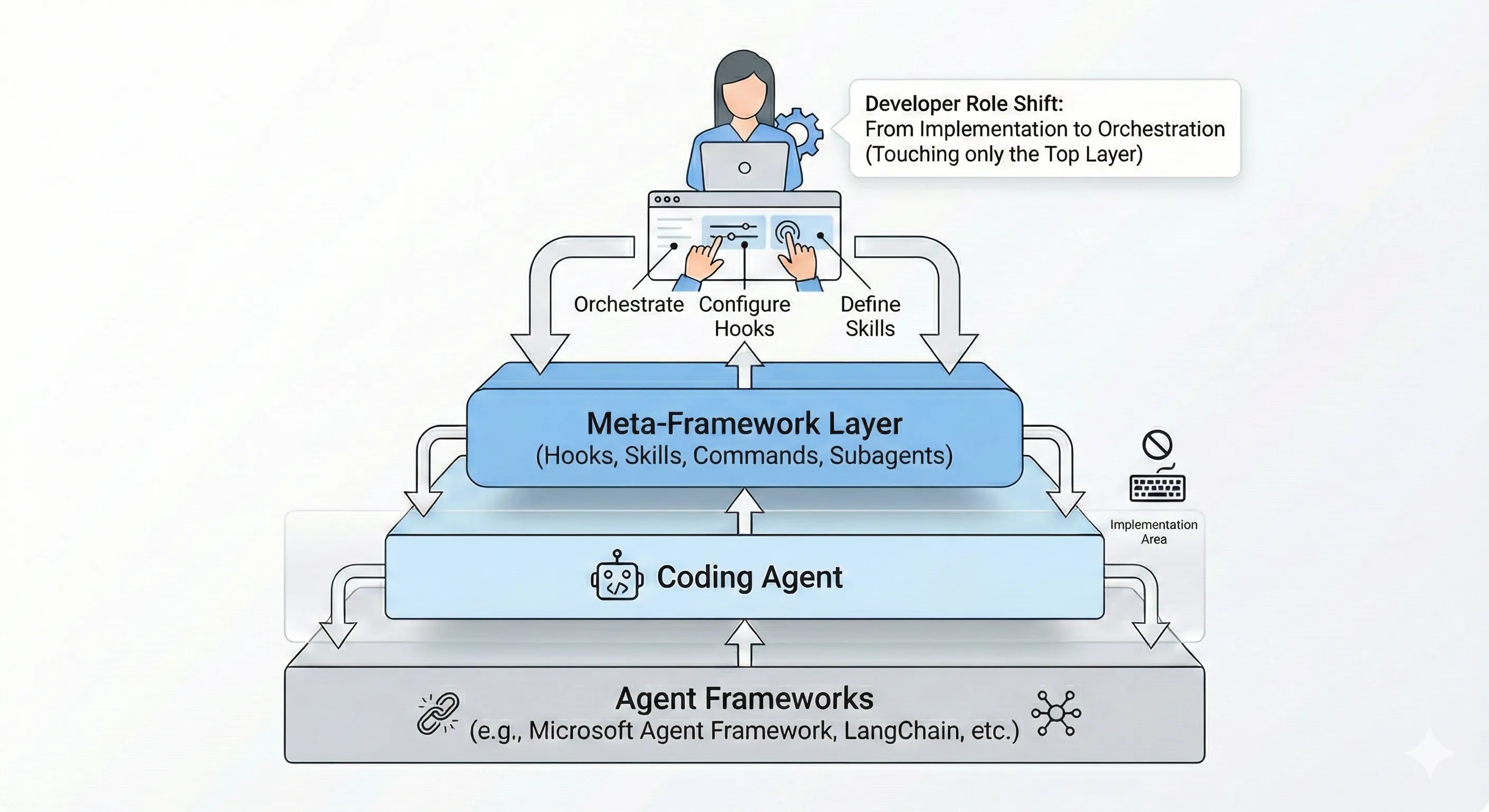
Instead, I wrote hooks, skills, and orchestration rules. This is the new reality of developer infrastructure. A meta-framework layer is emerging on top of coding agents — building on the foundational AI coding infrastructure patterns we established earlier — and Claude Code has formalized it with a layered architecture that puts tools at the center.
Key Takeaways
- Tools are what make agents agentic: Without tools, LLMs can only respond with text; with tools, they can act
- Tool overload degrades performance: Fewer, well-scoped tools per agent dramatically improve accuracy and reduce context waste
- One agent, one tool is the emerging pattern: Single-tool agents eliminate confusion and improve reliability
- Hooks are the control plane: Command hooks for deterministic checks, prompt hooks for flexible validation, agent hooks for multi-turn verification
- Skills package institutional knowledge: Define processes once, hot-reload them, run them in isolated contexts
- Level 4+ teams don’t review AI code: Focus shifts to proving systems work through testing and guardrails
The Five-Layer Stack
Claude Code’s architecture formalizes a five-layer stack for agent automation:
- Tools: The foundation of agentic behavior include file operations, search, execution, and web access
- Hooks: Event-driven automation at lifecycle points
- Skills: Packaged expertise that activates contextually
- Subagents: Isolated execution contexts with their own tool access
- Plugins: Distributable bundles combining all of the above
Each layer can define its own scoped tool permissions. The system is recursive in that a plugin can contain skills with their own hooks, which can spawn subagents that have restricted tool access.
Tools: The Foundation
Without tools, LLMs can only respond with text. With tools, they can act. Claude Code’s built-in tools fall into four categories:
- File operations: Read files, edit code, create new files, rename and reorganize
- Search: Find files by pattern, search content with regex, explore codebases
- Execution: Run shell commands, start servers, run tests, use git
- Web: Search the web, fetch documentation, look up error messages
The key insight is that you control which tools each agent has access to. This separation is critical because giving an agent too many tools degrades performance, while well-scoped tool access improves accuracy and reduces confusion.
Why Tool Separation Matters
A five-tool agent setup can consume ~55K tokens before any work begins. Add more tools and you quickly hit 100K+ tokens of overhead. But the real problem isn’t just context consumption, it’s accuracy.
Anthropic’s research shows that when agents have access to too many tools:
- Wrong tool selection becomes the most common failure mode
- Parameter inference degrades as options multiply
- Latency increases as the model processes tool descriptions
- Context waste leaves less room for actual work
The solution is clean separation. Single-tool agents eliminate ambiguity in tool selection and let agents focus purely on parameter inference rather than deciding which tool to invoke.
The Hierarchy of Reliability
From most to least reliable:
- Pure functions: Deterministic, side-effect controlled, cheaper, faster, fully testable
- Direct tool calls: Function calls with clear schemas
- Dynamic tool discovery: Load tools on-demand rather than upfront
Anthropic’s benchmarks show dynamic tool discovery improves accuracy dramatically. Opus 4 went from 49% to 74% accuracy while reducing token usage by 85%.
Hooks: The Control Plane
Hooks are user-defined commands or LLM prompts that execute at specific lifecycle points. They’re the foundation for building guardrails, automation, and quality gates.
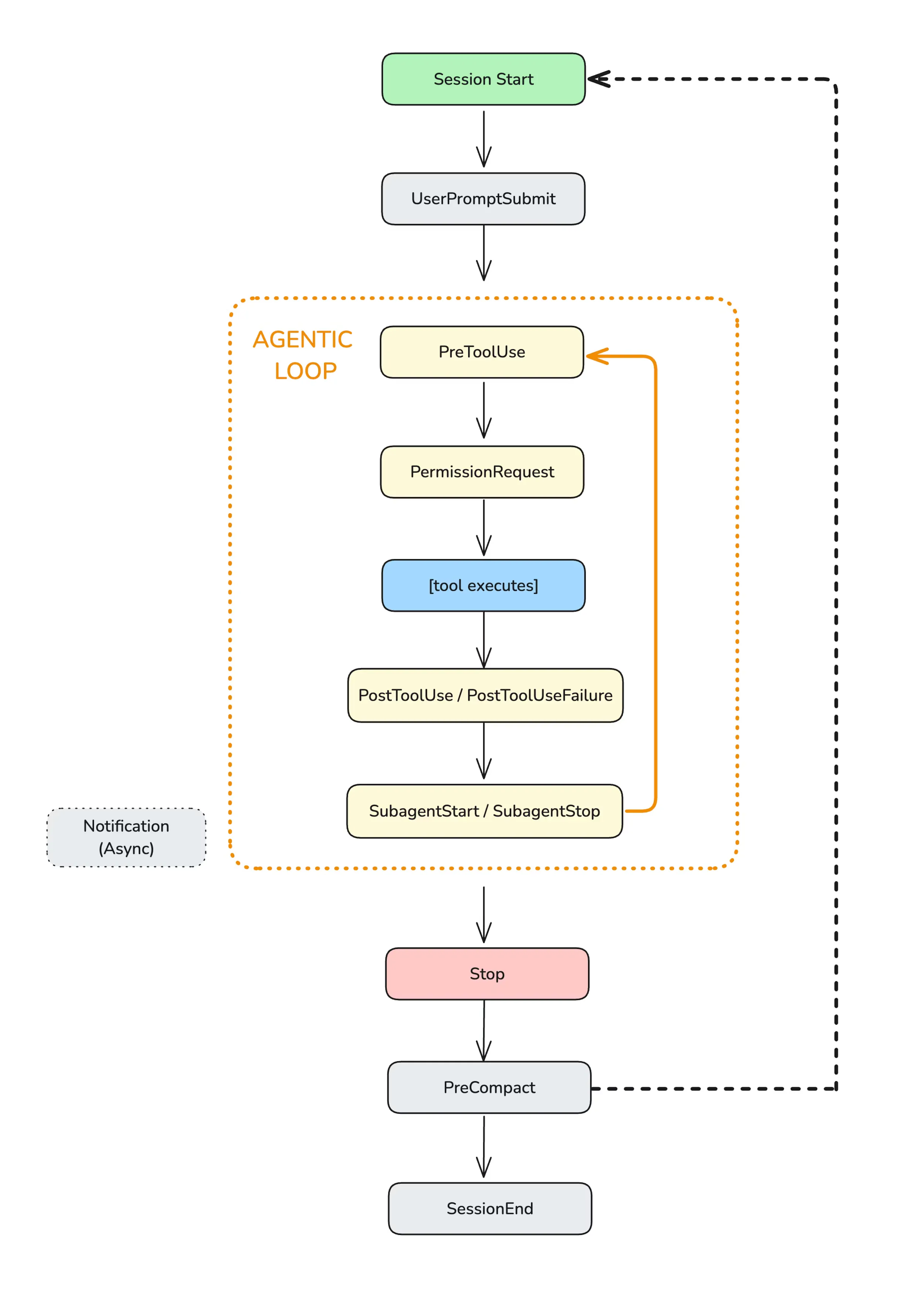
Hooks lifecycle in Claude Code’s agentic loop. Source: Anthropic
Three Types of Hooks
Command Hooks execute shell scripts for deterministic checks:
{ "hooks": { "PreToolUse": [ { "matcher": "Bash", "hooks": [ { "type": "command", "command": ".claude/hooks/validate-command.sh" } ] } ] }}Prompt Hooks use an LLM to evaluate conditions flexibly:
{ "hooks": { "Stop": [ { "hooks": [ { "type": "prompt", "prompt": "Check if all tasks are complete: $ARGUMENTS", "timeout": 30 } ] } ] }}Agent Hooks spawn multi-turn subagents for complex verification:
{ "hooks": { "Stop": [ { "hooks": [ { "type": "agent", "prompt": "Run the test suite and verify all tests pass. $ARGUMENTS", "timeout": 300 } ] } ] }}These hooks can run for up to 10 minutes which is enough time for full test suites or security scans before any change gets accepted.
Lifecycle Events
| Event | When It Fires | Use Case |
|---|---|---|
PreToolUse | Before a tool executes | Block dangerous commands |
PostToolUse | After successful execution | Run linters, tests |
UserPromptSubmit | When user submits input | Validate requests |
Stop | When agent finishes | Verify all work is complete |
Skills: Packaged Institutional Knowledge
Skills are markdown files with YAML frontmatter that define reusable agent behaviors. They activate automatically when their description matches the current task context.
---name: code-reviewdescription: Review code changes for quality and securitytools: Read, Grep, Glob, Bashhooks:  PreToolUse:    - matcher: "Edit|Write"      hooks:        - type: prompt          prompt: "Verify this change follows our style guide: $ARGUMENTS"---
## Code Review Process
When reviewing code changes:1. Check for security vulnerabilities2. Verify test coverage3. Ensure consistent style
Notice the tools field where skills can explicitly declare which tools they need access to. This is the “NPM for agent behaviors” pattern: define your code review process once, restrict its tool access, hot-reload it, and run it in isolated contexts with custom guardrails.
Tool Boundaries in Multi-Agent Systems
A single agent tasked with too many responsibilities becomes a “Jack of all trades, master of none.”
Multi-agent systems are the microservices architecture for AI:
- Specialization: Each agent focuses on a narrow domain with specific tools
- Decentralization: Failures are isolated; one agent’s confusion doesn’t cascade
- Clear interfaces: Agents communicate through defined channels, not shared state
When your coding tool can run commands in a terminal, you can often avoid complex integrations entirely. Instead of adding external adapters, write a script or add a Makefile command and tell the agent to use that instead. Simplicity wins.
The Inversion of CLI Design
Steve Yegge built a CLI with 100+ subcommands for his Beads project. His reasoning challenges conventional UX wisdom:
“The complicated Beads CLI isn’t for humans; it’s for agents.”
He implemented “whatever I saw the agents trying to do with Beads, until nearly every guess by an agent is now correct.” Traditional UX optimizes for human learnability. Agent-friendly design optimizes for predictable machine comprehension.
This pattern appears throughout the meta-framework layer: complexity at the orchestration level serves agent accuracy, while human developers interact at a higher abstraction layer.
Level 4+ Teams: No Code Review, Ever
Dan Shapiro’s Five Levels framework describes the progression of AI-assisted development:
- Level 0-2: AI assists; humans review everything
- Level 3: AI generates most code; humans review full-time
- Level 4: Engineering teams collaborate on specs; agents implement
- Level 5: Fully automated software factories
The critical learning from Level 4+ teams in Simon Willison’s observations: “Nobody reviews AI-produced code, ever. They don’t even look at it.”
This is a fundamental shift in what developers do. The focus moves to:
- System validation: Massive investment in testing, simulation, and tooling
- Proving correctness: Building guardrails that demonstrate the system works
- Agent enablement: Designing systems that help agents work effectively
Building Your Orchestration Layer
The pattern is clear: the most important code you write this year won’t be features. It’ll be the hooks, skills, and orchestration logic that govern your agents.
Here’s a practical starting point. Create .claude/settings.json in your project:
{ "hooks": { "PostToolUse": [ { "matcher": "Edit|Write", "hooks": [ { "type": "command", "command": "$CLAUDE_PROJECT_DIR/.claude/hooks/post-edit.sh", "async": true, "timeout": 120 } ] } ], "Stop": [ { "hooks": [ { "type": "prompt", "prompt": "Review the conversation. Are all requested tasks complete? Have tests been run? $ARGUMENTS" } ] } ] }}Then create .claude/hooks/post-edit.sh:
#!/bin/bash# Runs after every file edit
INPUT=$(cat)FILE_PATH=$(echo "$INPUT" | jq -r '.tool_input.file_path // empty')
# Only process source filesif [[ "$FILE_PATH" != *.ts && "$FILE_PATH" != *.js && "$FILE_PATH" != *.py ]]; then  exit 0fi
# Run your validation pipelinenpm run lint --quiet 2>&1 || truenpm test --quiet 2>&1 || true
exit 0
Conclusion
Tools are the foundation of agentic behavior. The meta-framework layer—hooks, skills, subagents—provides the infrastructure to orchestrate those tools effectively. Clean tool boundaries reduce confusion, improve accuracy, and let you build systems where agents excel at what they do best.
The developer role is shifting from implementation to orchestration. The question isn’t whether to adopt this pattern, it’s how quickly you can build the infrastructure that lets agents do the implementation while you focus on system design, guardrails, and verification. For a look at how five independent teams converged on these same patterns, see our deep dive on harness engineering.
What infrastructure are you building on top of your coding agents?
Reference Implementations
Complete Bash Command Validator Hook
This production-ready hook blocks dangerous shell commands before execution. Save to .claude/hooks/block-dangerous.sh:
#!/bin/bash# block-dangerous.sh - PreToolUse hook for Bash commands# Blocks destructive commands and requires confirmation for risky operations
set -euo pipefail
# Read JSON input from stdinINPUT=$(cat)COMMAND=$(echo "$INPUT" | jq -r '.tool_input.command // empty')
# Define blocked patternsBLOCKED_PATTERNS=(  "rm -rf /"  "rm -rf ~"  "rm -rf \$HOME"  ":(){:|:&};:"  # Fork bomb  "mkfs"  "dd if=/dev/"  "> /dev/sd"  "chmod -R 777 /"  "chown -R")
# Check for blocked patternsfor pattern in "${BLOCKED_PATTERNS[@]}"; do  if echo "$COMMAND" | grep -qE "$pattern"; then    jq -n '{      hookSpecificOutput: {        hookEventName: "PreToolUse",        permissionDecision: "deny",        permissionDecisionReason: "Blocked: Command matches dangerous pattern"      }    }'    exit 0  fidone
# Define patterns requiring user confirmationASK_PATTERNS=(  "rm -rf"  "git push.*--force"  "git reset --hard"  "DROP TABLE"  "DELETE FROM.*WHERE"  "npm publish"  "docker system prune")
for pattern in "${ASK_PATTERNS[@]}"; do  if echo "$COMMAND" | grep -qiE "$pattern"; then    jq -n --arg reason "Risky command detected: $pattern" '{      hookSpecificOutput: {        hookEventName: "PreToolUse",        permissionDecision: "ask",        permissionDecisionReason: $reason      }    }'    exit 0  fidone
# Allow other commandsexit 0
Configuration in .claude/settings.json:
{ "hooks": { "PreToolUse": [ { "matcher": "Bash", "hooks": [ { "type": "command", "command": "$CLAUDE_PROJECT_DIR/.claude/hooks/block-dangerous.sh" } ] } ] }}Complete Test-on-Save Hook
This async hook runs your test suite after every file modification without blocking the agent. Save to .claude/hooks/run-tests-async.sh:
#!/bin/bash# run-tests-async.sh - PostToolUse hook for Edit|Write# Runs tests asynchronously and reports results to Claude
INPUT=$(cat)FILE_PATH=$(echo "$INPUT" | jq -r '.tool_input.file_path // empty')
# Determine file type and test commandcase "$FILE_PATH" in  *.ts|*.tsx|*.js|*.jsx)    TEST_CMD="npm test -- --passWithNoTests --silent"    ;;  *.py)    TEST_CMD="pytest -q --tb=no"    ;;  *.go)    TEST_CMD="go test ./... -short"    ;;  *.rs)    TEST_CMD="cargo test --quiet"    ;;  *)    exit 0  # Skip non-source files    ;;esac
# Run tests and capture outputRESULT=$($TEST_CMD 2>&1)EXIT_CODE=$?
# Report results back to Claudeif [ $EXIT_CODE -eq 0 ]; then  jq -n --arg file "$FILE_PATH" '{    systemMessage: ("Tests passed after editing " + $file)  }'else  jq -n --arg file "$FILE_PATH" --arg result "$RESULT" '{    systemMessage: ("Tests failed after editing " + $file + ":\n" + $result)  }'fi
Complete Stop Verification Skill
Save to .claude/skills/verify-completion.md:
---name: verify-completiondescription: Verify all tasks are complete before stoppinghooks:  Stop:    - hooks:        - type: agent          prompt: |            Before allowing the agent to stop, verify:
            1. All explicitly requested tasks are complete            2. Any modified files have been saved            3. Tests have been run if code was changed            4. No errors remain unaddressed
            Check the transcript for uncompleted requests.            Use Grep to search for TODO or FIXME in modified files.
            Context: $ARGUMENTS
            Return {"ok": true} only if everything is verified.            Return {"ok": false, "reason": "..."} with specific unfinished items.          timeout: 60---
# Completion Verification
This skill ensures thorough completion before the agent stops working.
Complete Lint-on-Save Hook with Auto-Fix
#!/bin/bash# lint-and-fix.sh - PostToolUse hook that auto-fixes lint issues
INPUT=$(cat)FILE_PATH=$(echo "$INPUT" | jq -r '.tool_input.file_path // empty')TOOL_NAME=$(echo "$INPUT" | jq -r '.tool_name')
# Only run on successful writes/editsif [ "$TOOL_NAME" != "Write" ] && [ "$TOOL_NAME" != "Edit" ]; then  exit 0fi
# Detect project type and run appropriate linter with auto-fixif [ -f "package.json" ]; then  # JavaScript/TypeScript project  if command -v npx &> /dev/null; then    # Try eslint with fix    npx eslint --fix "$FILE_PATH" 2>/dev/null || true    # Try prettier    npx prettier --write "$FILE_PATH" 2>/dev/null || true  fielif [ -f "pyproject.toml" ] || [ -f "setup.py" ]; then  # Python project  if command -v ruff &> /dev/null; then    ruff check --fix "$FILE_PATH" 2>/dev/null || true    ruff format "$FILE_PATH" 2>/dev/null || true  elif command -v black &> /dev/null; then    black --quiet "$FILE_PATH" 2>/dev/null || true  fielif [ -f "go.mod" ]; then  # Go project  gofmt -w "$FILE_PATH" 2>/dev/null || true  goimports -w "$FILE_PATH" 2>/dev/null || truefi
# Suppress output to avoid cluttering agent contextexit 0
Sources
Stay in the loop
New posts delivered to your inbox. No spam, unsubscribe anytime.