Inside the Cloud VMs Powering Autonomous Coding Agents
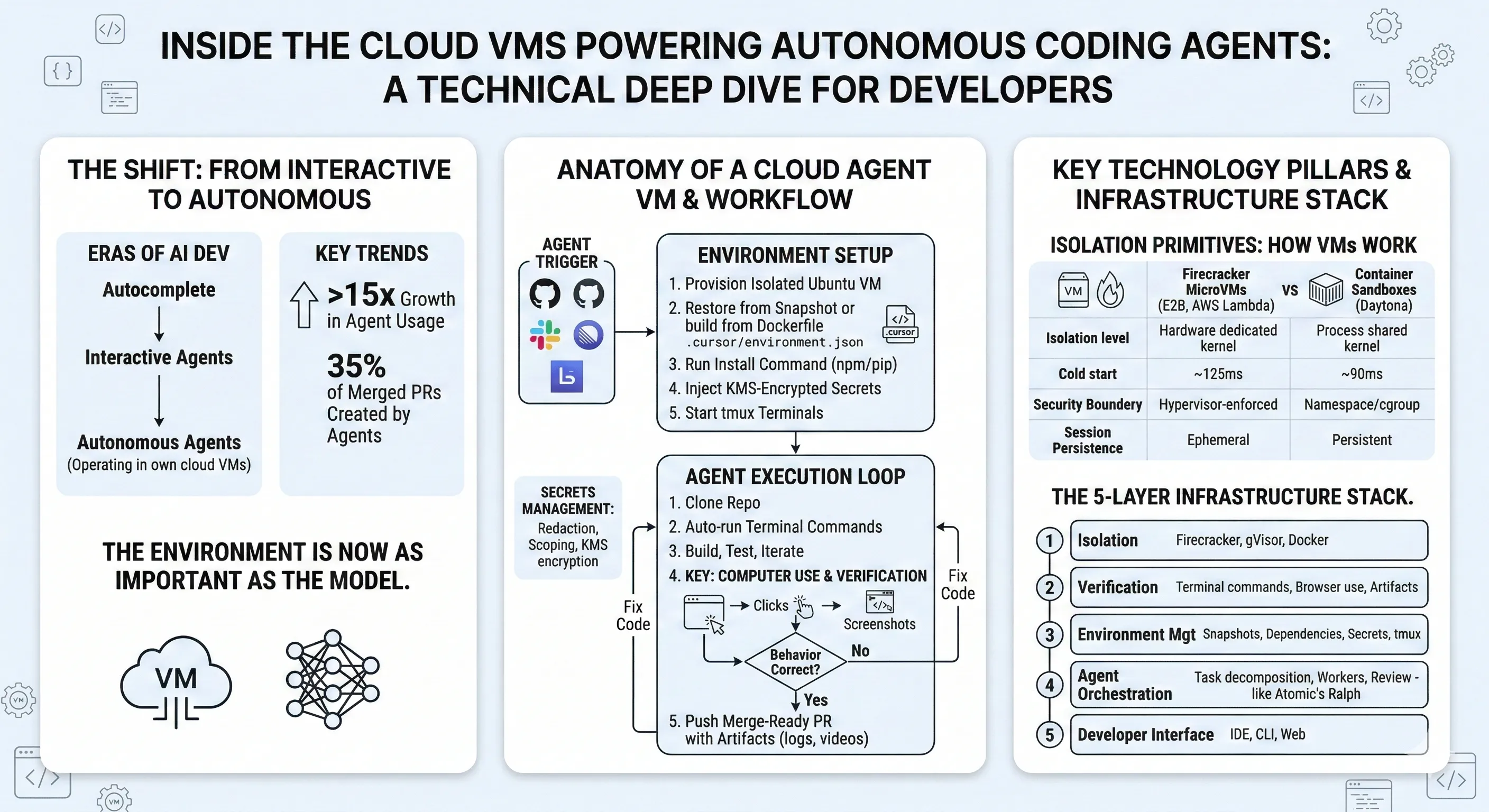
Key Takeaways
- Cursor’s cloud agents run in isolated Ubuntu VMs with full development environments — packages, servers, browsers — and auto-execute terminal commands without human approval.
- The environment is now as important as the model. Snapshot-based bootstrapping, KMS-encrypted secrets, Dockerfile-driven configuration, and shared tmux sessions form the infrastructure layer that turns a language model into an autonomous developer.
- Computer use closes the verification loop. Agents start dev servers, open browsers, click through UI, screenshot evidence, and fix issues — all before pushing a merge-ready PR.
- Firecracker microVMs (E2B, Vercel) and container-based sandboxes (Daytona) are the two dominant isolation primitives underneath these systems, each with distinct startup-time and security tradeoffs.
- You can run this pattern yourself today with git worktrees and autonomous execution tools — multiple parallel agent sessions on separate branches, running unattended for hours on cloud VMs.
The Third Era of AI Development
Cursor recently published data that maps a clear progression in how developers use AI tooling. In the company’s framing, the first era was autocomplete — Tab. The second era was interactive agents — conversational back-and-forth in the editor. The third era is autonomous agents operating in their own cloud environments.
The numbers back this up. Agent usage in Cursor grew over 15x in the past year. In March 2025, Tab users outnumbered agent users 2.5-to-1. That ratio has fully inverted: there are now 2x more agent users than Tab users. And 35% of Cursor’s own merged PRs are created by agents operating autonomously in cloud VMs.
Michael Truell, Cursor’s CEO, put it directly: “Cursor is no longer primarily about writing code. It is about helping developers build the factory that creates their software.”
This shift isn’t just a product narrative. It reflects a real architectural change in how AI development tools are built. The critical question is no longer “which model is best?” but “what environment does the agent run in?”
Anatomy of a Cloud Agent VM
Each Cursor cloud agent runs on an isolated Ubuntu machine. This isn’t a container sharing a kernel with other tenants. It’s an isolated VM with its own full development environment — system packages, language runtimes, dev servers, test suites, and browsers.
Environment Configuration
Cursor provides two paths for setting up the VM environment. Both produce the same result — a configured machine ready for the agent to work in.
Option 1: Agent-driven setup. You point Cursor at a repository, provide secrets, and let the agent figure out how to install dependencies and run the project. Once it succeeds, you save a snapshot of the VM state for reuse.
Option 2: Dockerfile. You define a .cursor/environment.json that specifies a Dockerfile and install commands:
{ "build": { "dockerfile": "Dockerfile", "context": "." }, "install": "npm install && npm run build", "terminals": [ { "name": "dev-server", "command": "npm run dev" }, { "name": "test-watcher", "command": "npm run test:watch" } ]}Both build and install paths are relative to the .cursor directory. The terminals field defines persistent processes that run in a shared tmux session — your dev server, test watcher, or any long-running process the agent needs.
The critical constraint in the Dockerfile approach: do not COPY the full project into the image. Cursor manages the workspace and checks out the correct commit. The Dockerfile handles system-level dependencies only — compilers, runtimes, native libraries.
Snapshot-Based Bootstrapping
After an agent completes environment setup, you can save the VM state as a snapshot. Future agents boot from that snapshot instead of running the full install sequence from scratch. This is the difference between a 30-second cold start and a multi-minute dependency installation.
The startup sequence is deterministic:
- Restore snapshot (or build from Dockerfile)
- Run install command — must be idempotent, since it runs on every fresh boot. Only disk state persists; running processes do not.
- Execute start command — launches Docker or similar services
- Spin up configured terminals — persistent processes in the shared tmux session
Secrets Management
Secrets are managed through Cursor’s dashboard and encrypted at rest using KMS. They’re exposed as environment variables to the cloud agent. Key features:
- Redaction: Secrets can be marked as redacted so agents can’t accidentally commit them to source control.
- Scoping: Secrets can be shared across a workspace or restricted to specific team agents.
- Monorepo support: Use naming conventions (e.g.,
NEXTJS_DATABASE_URL,CONVEX_API_KEY) to scope secrets to specific services in a monorepo.
Snapshots can optionally include .env.local files, though the Secrets tab with KMS encryption is the recommended approach.
Computer Use: Closing the Verification Loop
The February 2025 update added a capability that fundamentally changes what “done” means for an agent: computer use.
Each cloud agent VM includes a full desktop environment. Agents control it with mouse and keyboard — the same way a human developer would. They can start a dev server, open a browser, navigate to localhost, click through a UI flow, verify the behavior, and fix any issues they find.
This isn’t screen-scraping or DOM parsing. The agent operates the full desktop environment — navigating web pages, manipulating tools, interpreting visual output, and making decisions based on what it sees.
The practical effect: an agent building a frontend feature can open the page in a browser, click the button it just implemented, verify the UI renders correctly, and capture a screenshot as proof. If something is broken, it loops back, fixes the code, and re-verifies. This verification feedback loop is exactly the kind of engineering discipline that AI agents demand — and it consistently produces higher-quality output than error-free sessions without verification.
Cursor’s blog showed a concrete example: an agent that needed to test a marketplace page behind a feature flag. The agent temporarily bypassed the feature flag gating, loaded the page in a browser, clicked through the UI to verify functionality, then reverted the flag bypass before pushing.
When agents complete their work, they attach artifacts to the PR — screenshots, video recordings of the browser session, and log references. Reviewers can validate changes without checking out the branch locally.
The Isolation Primitives: How VMs Actually Work
Underneath the product-level features, the isolation infrastructure follows one of two dominant architectures.
Firecracker MicroVMs
Firecracker, originally built by AWS for Lambda and Fargate, is the most widely adopted isolation primitive for AI agent sandboxes. It creates lightweight virtual machines that boot in around 125ms and consume as little as 5MB of memory overhead.
The key property: hardware-level isolation with each VM getting its own Linux kernel. There is no shared kernel surface between tenants. This matters for AI agents because they execute arbitrary, untrusted code — installing packages, running build scripts, manipulating file systems. A shared-kernel container (standard Docker with runc) exposes a much larger attack surface.
E2B, one of the most prominent agent sandbox platforms, runs on Firecracker. Their architecture:
AI Application → E2B SDK → API Gateway → Sandbox Orchestrator → Pre-warmed Firecracker VM PoolE2B maintains a pool of pre-warmed VMs — Firecracker instances already booted and waiting for assignment. When an agent needs a sandbox, it gets a warm VM from the pool rather than booting cold. This is how they achieve ~150ms sandbox creation times.
Each sandbox provides SSH access, an interactive terminal, filesystem operations, and lifecycle webhooks. Sessions last up to 24 hours on the Pro tier.
Container-Based Sandboxes
Daytona takes the opposite approach: Docker container isolation with persistent workspaces. The tradeoff is speed over isolation boundary — Daytona achieves sub-90ms cold starts by sharing the host kernel, but doesn’t provide the hardware-level separation that Firecracker offers.
The container approach works well when you control the code being executed (your own agents, your own repositories) and need persistent state between sessions. The microVM approach is better when executing fully untrusted code from arbitrary sources.
| Property | Firecracker MicroVM (E2B) | Container (Daytona) |
|---|---|---|
| Isolation level | Hardware (dedicated kernel) | Process (shared kernel) |
| Cold start | ~150ms | ~90ms |
| Security boundary | Hypervisor-enforced | Namespace/cgroup-enforced |
| Session persistence | Ephemeral (up to 24h) | Persistent workspaces |
| Best for | Untrusted code execution | Controlled agent workflows |
The industry trend is clear: shared-kernel containers are no longer considered sufficient for executing untrusted AI-generated code. AWS, Azure, and GCP have all moved their control planes toward hardware-enforced isolation. For AI agent infrastructure specifically, Firecracker and gVisor (Google’s user-space kernel, used by Modal) are the two dominant approaches.
Running Autonomous Agents Yourself
You don’t need Cursor’s cloud infrastructure to run this pattern. The core loop — decompose a task, execute autonomously, verify, push results — can run on any cloud VM with the right tooling.
The Worktree Pattern
The real leverage in autonomous agents comes from parallelism: multiple agents working simultaneously on separate branches. Git worktrees make this possible without duplicating the full repository:
# Create three worktrees for parallel agent workgit worktree add ../project-auth feature/auth-modulegit worktree add ../project-search feature/search-apigit worktree add ../project-dashboard feature/dashboard-ui
# Each worktree is an independent working directory# on its own branch, sharing the same git object store
Each worktree gets its own working directory with its own branch. Agents operating in separate worktrees can’t interfere with each other — no merge conflicts, no file locks, no port collisions (as long as you assign different ports).
On a cloud VM, this is particularly powerful. The VM stays alive regardless of your laptop’s state. Three tmux panes, three worktrees, three autonomous sessions. Walk away, come back to three complete implementations on separate branches ready for review.
Autonomous Execution with Atomic
Atomic implements this pattern through Ralph — its autonomous execution mode. Ralph operates in three phases:
Phase 1 transforms a high-level spec into a structured JSON task list. Each task has an ID, content description, status, and dependency information:
[ { "id": "auth-1", "content": "Implement JWT token generation with RS256 signing", "status": "pending", "blockedBy": [] }, { "id": "auth-2", "content": "Add token refresh endpoint with rotation", "status": "pending", "blockedBy": ["auth-1"] }]Phase 2 iterates through the task list, spawning worker sub-agents for each task. Workers read the current state from disk, implement the task, and update tasks.json via a TodoWrite tool. The loop runs up to tasks.length * 2 iterations as a safety bound.
Phase 3 spawns a reviewer sub-agent that audits the entire implementation. If issues are found, fix specs are generated and the cycle re-enters decomposition.
Sessions persist to disk at ~/.atomic/workflows/sessions/{sessionId}/ and can be resumed after interruptions with --resume <uuid>. The entire thing runs inside a tmux session on a cloud VM — SSH in, kick it off, disconnect, come back to results.
The Infrastructure Stack That Matters
The pattern across all these systems reveals a common infrastructure stack:
Layer 1 — Isolation. The hypervisor or container runtime that keeps agent execution sandboxed. Firecracker for hardware-level isolation, gVisor for user-space kernel isolation, or Docker containers for speed-optimized workflows.
Layer 2 — Verification. The tools that let agents confirm their work — terminal execution, dev server management, browser control (computer use), and artifact generation (screenshots, videos, logs).
Layer 3 — Environment Management. Snapshot-based bootstrapping, dependency installation, secrets injection, and terminal session management. This layer determines whether an agent takes 30 seconds or 5 minutes to become productive.
Layer 4 — Agent Orchestration. Task decomposition, worker dispatch, progress tracking, and review passes. This is where tools like Atomic’s Ralph operate — turning a spec into a structured execution plan and managing the work.
Layer 5 — Developer Interface. How developers interact with the system — kicking off agents from an IDE, CLI, Slack, Linear, GitHub comments, or a web dashboard.
The gap in most setups today is Layers 2 and 3. Models are good enough (Layer 4 works). Isolation primitives exist (Layer 1 is solved). But the environment management and verification layers — the parts that let agents actually run code, see what they built, and prove it works — are where the real engineering is happening.
What This Means for Your Workflow
You don’t need to wait for a single vendor to ship the full stack. The components exist today:
- Spin up a cloud VM — any provider, Ubuntu, enough RAM for your project’s build toolchain.
- Configure your environment — Dockerfile or setup script, secrets as environment variables, tmux for session persistence.
- Use git worktrees for parallelism — one branch per agent, independent working directories, no interference.
- Pick your agent — Cursor cloud agents if you want the managed experience, Claude Code or Atomic’s Ralph if you want control over the orchestration.
- Let agents verify their own work — dev servers, test suites, and browser-based verification are the difference between agents that write code and agents that ship code.
The environment agents run in is becoming as important as the model powering them. Isolated VMs, disk-based memory, snapshot-based bootstrapping, secrets management — this is the infrastructure layer that lets agents operate over hours instead of minutes. The teams that build or adopt this stack first will have a compounding advantage: every agent session that runs unattended is developer time redirected to higher-leverage work.
Resources
- Cursor: The Third Era: cursor.com/blog/third-era — Usage data and vision for autonomous agents
- Cursor: Agent Computer Use: cursor.com/blog/agent-computer-use — Browser verification and desktop control
- Cursor Cloud Agent Docs: cursor.com/docs/cloud-agent — VM setup, environment.json, secrets management
- E2B: e2b.dev — Firecracker microVM sandbox platform for AI agents
- Daytona: daytona.io — Container-based AI sandbox infrastructure
- Firecracker: github.com/firecracker-microvm/firecracker — AWS’s open-source microVM monitor
- Atomic: github.com/bastani-inc/atomic — Autonomous agent execution with Ralph
Stay in the loop
New posts delivered to your inbox. No spam, unsubscribe anytime.