Stop Building Subagents. Start Writing Skills.
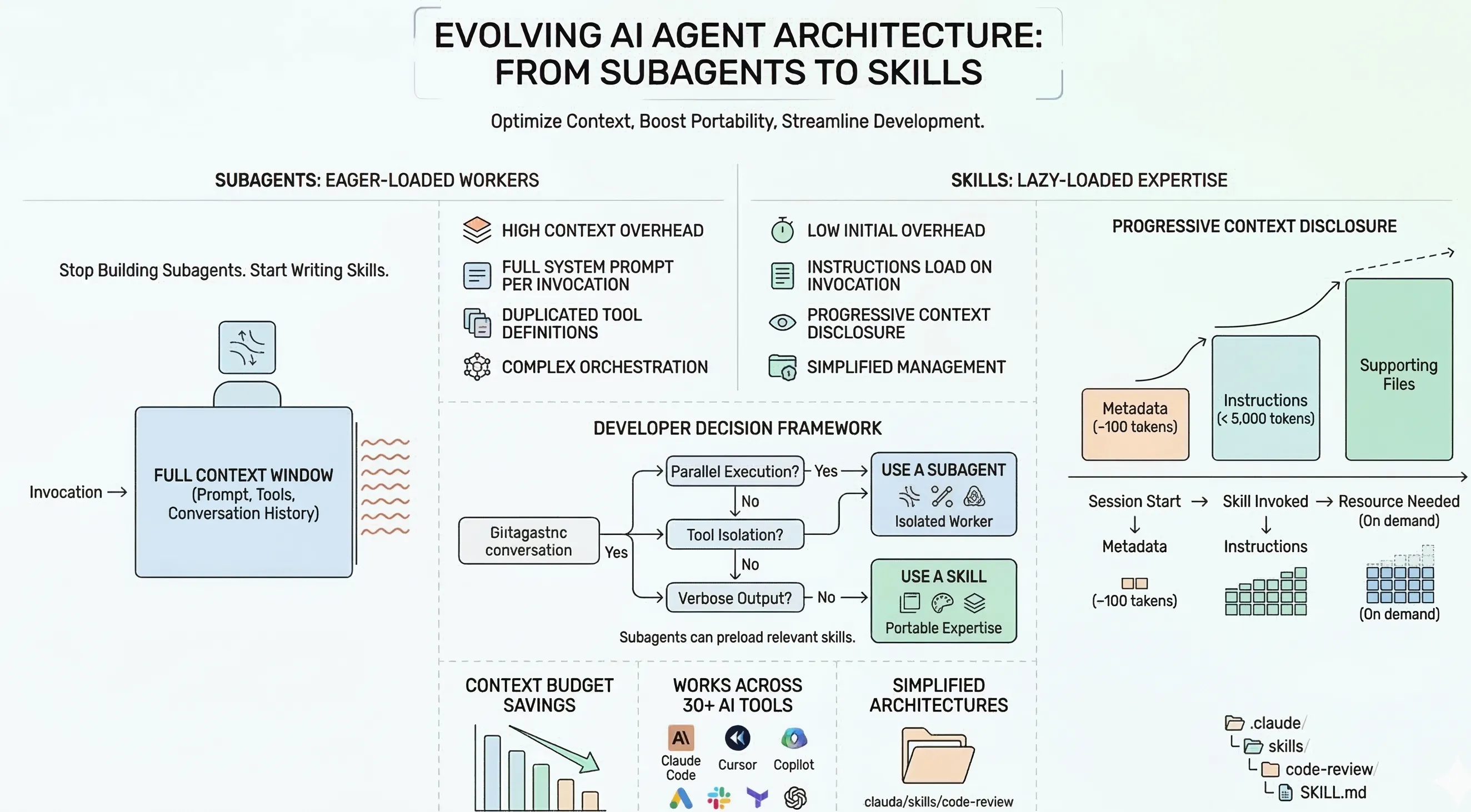
Your context window is a budget. Subagents blow through it. Skills don’t.
We had a code review subagent. A generation subagent. A research subagent. A style consistency subagent. Each carried its own system prompt, its own context window, its own initialization cost. They worked — until managing them became the bottleneck.
We replaced all of them with skills. Same capabilities. A fraction of the overhead.
The difference isn’t cosmetic. It’s architectural. And if you’re building AI-assisted development workflows in Claude Code, Cursor, or any of the 30+ tools that now support the Agent Skills standard, understanding this difference will save you real context budget and real complexity.
Your context window is a budget. Skills respect it.
Subagents are eager-loaded. Every invocation spins up a fresh context window carrying the full system prompt, tool definitions, and conversation context — whether you need all of it or not. Ten subagents means ten separate context windows, each paying the full cost upfront.
Skills are lazy-loaded through a mechanism the Agent Skills specification calls progressive context disclosure. It works in three stages:
When Claude Code starts a session, it loads only the name and description from each installed skill — roughly 100 tokens per skill. The full instruction body (recommended under 5,000 tokens) loads only when the skill is invoked. Supporting files — scripts, reference docs, templates — load on demand, only when the agent determines they’re needed during execution.
You can have dozens of skills installed and pay almost nothing until one is actually called. The Claude Code documentation specifies the budget explicitly: skill descriptions consume approximately 2% of the context window, with a 16,000-character fallback.
Compare that to spinning up a subagent with a multi-thousand-token system prompt every time you need a code review.
Here’s the complete structure of a skill:
code-review/├── SKILL.md # Required: metadata + instructions├── references/ # Optional: style guides, examples└── scripts/ # Optional: linting configs, checksAnd here’s the SKILL.md itself:
---name: code-reviewdescription: >-  Reviews code changes for correctness, performance, and security.  Checks for anti-patterns and suggests concrete fixes.---
## When to use
Invoke this skill when reviewing pull requests, staged changes, or code diffs.
## Instructions
1. Read the changed files in their full context2. Check for correctness issues first, style issues second3. Flag security vulnerabilities with severity ratings4. Suggest concrete fixes, not abstract advice
That’s it. A directory with a Markdown file. No framework. No SDK. No orchestration layer. The metadata frontmatter stays in context so the agent knows the skill exists. The instruction body loads only when you need it.
Folder structure replaces orchestration logic
The second advantage is project-scoped expertise through automatic discovery.
Claude Code resolves skills hierarchically, with higher-priority locations winning when names conflict:
| Priority | Location | Path | Scope |
|---|---|---|---|
| Highest | Enterprise | Managed settings | All users in org |
| Personal | ~/.claude/skills/ | All your projects | |
| Project | .claude/skills/ | This project only | |
| Lowest | Plugin | <plugin>/skills/ | Where plugin is enabled |
The feature that matters for teams: nested directory auto-discovery. From the Claude Code docs: “When you work with files in subdirectories, Claude Code automatically discovers skills from nested .claude/skills/ directories.”
In practice, a monorepo looks like this:
monorepo/├── .claude/skills/│ └── shared-conventions/│ └── SKILL.md # Applies everywhere├── packages/│ ├── frontend/│ │ └── .claude/skills/│ │ └── react-patterns/│ │ └── SKILL.md # Only when editing frontend/│ └── backend/│ └── .claude/skills/│ └── api-standards/│ └── SKILL.md # Only when editing backend/When you’re editing a file in packages/frontend/, Claude loads the frontend skills automatically. Switch to backend code, and the backend skills activate instead.
No routing logic. No subagent orchestration. No conditional dispatch based on file paths. The folder structure is the routing.
This eliminates an entire class of problems: the code reviewer that applies React conventions to Go code, the generator that doesn’t know which framework you’re in, the style enforcer that fights your team’s actual conventions.
Portable expertise, not isolated workers
A skill works identically whether invoked from a code generation workflow, a review pass, or a deployment pipeline. It’s expertise that makes the agent better everywhere it’s loaded.
This portability extends beyond a single tool. The Agent Skills format is an open standard maintained at agentskills.io, with adoption from over 30 tools — Claude Code, Cursor, GitHub Copilot, OpenAI Codex, Gemini CLI, JetBrains Junie, Roo Code, Amp, and more.
Installation is one command via the Vercel-backed CLI:
npx skills add anthropics/skills --skill frontend-designOr skip the CLI and create one by hand:
mkdir -p .claude/skills/my-skill# Add your SKILL.md with frontmatter + instructionsOne caveat worth noting honestly: the open standard specifies a minimal base — name, description, and Markdown instructions. Claude Code’s advanced features like context: fork, disable-model-invocation, hooks, and model selection are extensions, not part of the portable spec. A skill using only base fields works across all 30+ tools. A skill using Claude-specific features won’t.
Write to the base spec by default. Use extensions when you need them. Your skills stay portable.
Subagents still have a job — a smaller one
Skills don’t replace subagents entirely. Subagents are the right choice when you need:
- Parallel execution with isolated context — running tests, builds, and linting simultaneously without cross-contamination
- Tool isolation — restricting which tools an agent can access for security or scoping
- Long-running tasks — work that produces verbose output you don’t want polluting the main conversation
- Different model selection — using a faster, cheaper model for simple tasks
The mental model that emerged from our switch: skills are portable expertise, subagents are isolated workers. And subagents should use skills, not replace them.
Claude Code supports this directly — subagent definitions can preload skills via a skills field in their frontmatter, giving the isolated worker access to specialized knowledge without duplicating it into the system prompt. One important constraint: subagents cannot spawn other subagents. They’re leaf nodes, not orchestrators.
Here’s a decision framework:
The ecosystem already moved
Anthropic’s skills repository is the most-starred repo in their GitHub org with over 90,000 stars. The open standard has over 13,000 stars and 34 contributors. Multiple third-party directories have emerged — skills.sh backed by Vercel Labs, agentskill.sh, and others — collectively indexing tens of thousands of community-contributed skills.
This isn’t a feature announcement. It’s an ecosystem shift. When 30+ tools converge on the same primitive, the tooling and community resources compound fast.
The barrier to entry is a Markdown file in the right directory. The ceiling is as high as your workflow demands.
Start with a skill. Upgrade to a subagent only when you need isolation or parallelism. Your context window is too valuable to spend on infrastructure that could be lazy-loaded.
References
- Claude Code Skills Documentation — Anthropic’s official reference for skill architecture, loading behavior, and configuration
- Claude Code Sub-agents Documentation — Official guide for when and how to use subagents
- Agent Skills Specification — The open standard for cross-tool skill portability
- Agent Skills Adopters — Full list of 30+ tools supporting the Agent Skills format
- anthropics/skills — Anthropic’s official skills repository with example implementations
- Vercel Labs Skills CLI — CLI tool for installing and managing skills across agents
Stay in the loop
New posts delivered to your inbox. No spam, unsubscribe anytime.