Three Things I Learned Using Coding Agents with 1M-Token Models
Key Takeaways
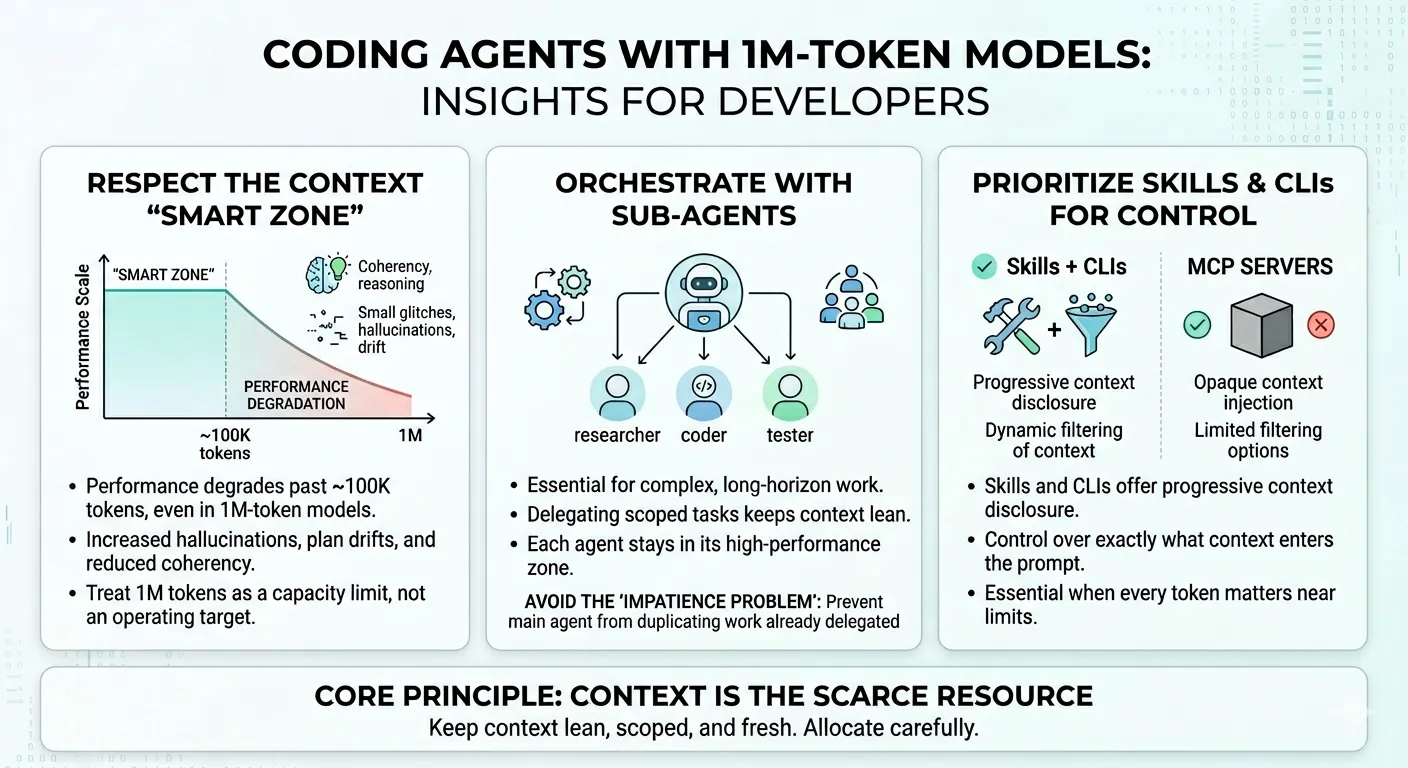
- The effective context window is far smaller than advertised. Even with 1M-token models, performance degrades noticeably past ~100K tokens — worse coherency, more hallucinations, and planning drift. Treat the full window as a capacity limit, not an operating target.
- Sub-agents are essential for long-horizon work. Delegating scoped tasks to sub-agents keeps each agent in its “smart zone” and prevents context pollution. Watch for the “impatience problem” where the main agent duplicates work already delegated.
- Skills + CLIs beat MCP servers for context control. Skills offer progressive context disclosure and dynamic filtering. MCP servers push opaque context with limited filtering — a critical difference when every token counts.
- Context is the scarce resource, not capability. Compaction strategy, sub-agent architecture, and tool selection should all be designed around keeping context lean, scoped, and fresh.
I’ve been using coding agents heavily — primarily Copilot CLI and the SDK, but also Claude Code and other agentic tools — alongside the 1M-token context models (Codex 5.4 and Opus/Sonnet 4.6). While the examples below are drawn from my Copilot CLI workflow, these patterns apply to any coding agent that operates on long-context models: Claude Code, Cursor, Windsurf, Aider, or whatever you’re using. The underlying constraints are model-level, not tool-specific.
My workflow has evolved significantly from where most people start. Most developers see “1M tokens” and think “I can throw everything at the model.” The results are predictably bad. Worse coherency. More hallucinations. Plans that drift until they’re unrecognizable. The full context window is a capacity limit, not an operating target.
Here are three patterns that fundamentally changed how I work with these tools.
1. The “Smart Zone” Is Much Smaller Than You Think
Even though these models support context windows of up to 1 million tokens, the effective performance zone is significantly smaller — and the reasons are architectural, not incidental.
Why the limitation exists
Most 1M-token models aren’t fundamentally larger or smarter than their shorter-context predecessors. They achieve extended context through mathematical techniques like YaRN (Yet another RoPE extensioN) that stretch the model’s sequence length without adding parameters. The context window grows, but the model’s core reasoning capacity — what HumanLayer calls the “instruction budget” — stays the same.
The instruction budget is the number of instructions a model can reliably follow before adherence starts to drop. It’s strongly correlated with the model’s parameter count and instruction tuning quality, not with its context window size. When you extend the context 5x without scaling the instruction budget, you can fit more information in, but the model isn’t actually better at attending to it. HumanLayer found this firsthand when they tested Claude Opus 4.6 (1M context): instruction adherence degraded not just at capacity limits, but across all context lengths compared to the shorter-context Opus 4.5.
Think of it this way: your context window is a haystack where tool calls, documents, and files are the hay. The quality of the agent’s next action depends on its ability to find the right needle — the most relevant instruction for the current state. Expanding the haystack 5x without improving the model’s needle-finding ability just buries the signal deeper.
What degradation looks like in practice
Through experimentation across different prompt and context sizes, model performance starts to noticeably degrade past approximately 100K tokens. This shows up as:
- Worse task coherency — the model loses track of the overall objective
- Reduced reasoning reliability — logical chains break down
- Increased hallucination rate — the model confidently fabricates details
- Planning drift in long-horizon tasks — multi-step plans veer off course
- Instruction disobedience — the model ignores design documents, misunderstands simple instructions, or makes trivial mistakes it wouldn’t make in a leaner context
This isn’t theoretical. I’ve watched agents produce clean, well-reasoned output at 80K tokens, then fall apart at 150K with the same task and codebase. The degradation isn’t binary — it’s a gradient. But the inflection point is consistent enough that I’ve built my workflow around it. HumanLayer observed the same pattern — they shifted their context warnings to trigger at 100K tokens rather than at a percentage of the usable window.
What works
- Trigger auto-compaction earlier. Don’t wait until the context window is full. Set compaction thresholds well below the model’s maximum capacity.
- Periodically clear the context window. Persist progress to disk — research docs, specs, task lists — then start fresh sessions that load only what’s needed for the current phase.
- Stop max-packing prompts. The fact that the model allows 1M tokens doesn’t mean you should use them. Treat the full window as headroom for unexpected context growth, not as the target operating point.
The practical rule: treat the full 1M window as a capacity limit, not an operating target. More context isn’t more capability. Design your workflows around staying well under it.
2. Use Sub-Agents to Offload Long-Horizon Work
One of the most effective patterns I’ve found is spawning sub-agents to balance the main agent’s context and handle complex or long-running tasks.
The concept is straightforward: instead of stuffing everything into one agent’s context window, delegate scoped work to sub-agents that operate in their own context windows. The orchestrating agent receives condensed results. Its context stays lean. Each sub-agent gets only the information it needs.
This directly addresses the context degradation problem. If you can keep each agent under 100K tokens by distributing work across multiple agents, you stay in the “smart zone” even for tasks that would otherwise require 300K+ tokens of total context.
The Orchestrator Pattern
Below is a template I use for an orchestrator sub-agent, (adapted from HumanLayer’s work on sub-agent orchestration, with modifications for my workflow):
---name: orchestratordescription: Orchestrate sub-agents to accomplish complex long-horizon tasks             without losing coherency by delegating to sub-agents.tools: ["execute", "agent", "edit", "search", "read"]---
You are a sub-agent orchestrator. The most important tool available to youis the one that dispatches sub-agents: either `Agent` or `Task`.
All non-trivial operations should be delegated to sub-agents.
Delegate research and codebase understanding tasks to codebase-analyzer,codebase-locator, and pattern-locator sub-agents.
Delegate running bash commands (particularly ones likely to produce lotsof output) to Bash sub-agents.
Use separate sub-agents for separate tasks, and launch them in parallel —but do not delegate tasks with significant overlap to separate sub-agents.
The key design decisions:
- Separate sub-agents for separate tasks — prevents context pollution between unrelated work
- Parallel execution — sub-agents can work simultaneously on independent tasks
- No overlapping delegation — avoids duplicate work and conflicting outputs
The Impatience Problem
There’s a behavioral quirk worth calling out. The post-training behavior of these models tends to favor smaller-model-style execution patterns. In practice, this means the main agent becomes impatient — it attempts to complete a task that’s already been delegated to a sub-agent.
This defeats the purpose of sub-agents entirely. You get:
- Context pollution — the main agent duplicates work happening in a sub-agent
- Duplicate work — wasted compute and potentially conflicting outputs
- Planning drift — the main agent’s plan diverges from the sub-agent’s execution
- Loss of orchestration coherency — the delegation structure breaks down
That’s why I explicitly include this instruction in every orchestrator prompt:
IMPORTANT: Sometimes sub-agents will take a long time. DO NOT attempt to do the job yourself while waiting for the sub-agent to respond. Instead, use the time to plan out your next steps, or ask the user follow-up questions to clarify the task requirements.
This isn’t specific to any one tool. It’s a model-level behavioral tendency — the post-training optimization makes models want to “do something” rather than wait. I first noticed it in Copilot CLI, but the same pattern shows up in Claude Code, Cursor, and other agentic systems. The explicit instruction overrides that default regardless of which agent you’re using.
3. Prefer Skills + CLIs Over MCP Servers
In practice, I consistently favor Skills + CLIs over MCP servers for agent tool integration.
The reason is context control. Skills and CLIs support:
- Progressive context disclosure — you control exactly what context enters the prompt window, when, and in what form
- Dynamic filtering — you can scope the retrieved context based on the current task
MCP servers, by contrast, often:
- Push opaque context — the server decides what to include, and you have limited visibility into what enters your prompt
- Provide limited filtering — the architectural design of MCP makes it harder to control the granularity of context injection
This distinction becomes critical once you’re operating near the 100K+ token regime. When every token of context matters, you need tight control over what the agent “knows” at any point in time. Skills give you that control. MCP servers often don’t.
Skill Registries for Discoverable Capabilities
To ground coding agents with capabilities they can dynamically discover and download, two registries are worth knowing:
- The Agent Skills Directory — a curated directory of reusable agent skills
- microsoft/skills — Microsoft’s open-source skill repository
These registries let agents find and adopt capabilities without ballooning the primary context with skill definitions that aren’t needed for the current task. The skill gets loaded when it’s needed, used, and then the context is reclaimed.
The Pattern
All three tips point to the same underlying principle: context is the scarce resource, not capability.
The models are capable enough. The context window is large enough. But the effective operating zone is much smaller than the theoretical maximum. Everything you do — compaction strategy, sub-agent architecture, tool selection — should be designed around keeping context lean, scoped, and fresh.
Treat context like memory in a constrained system. Allocate carefully. Free aggressively. Never assume that having more headroom means you should use it.
References
- HumanLayer, “Long-Context Isn’t the Answer”: hlyr.dev/blog/long-context-isnt-the-answer
- Peng et al., “YaRN: Efficient Context Window Extension of Large Language Models”: arxiv.org/pdf/2309.00071
- The Agent Skills Directory: skills.sh
- Microsoft Skills Repository: github.com/microsoft/skills
Stay in the loop
New posts delivered to your inbox. No spam, unsubscribe anytime.